Objective AI Report
Disclaimer: I am Medbidding AI. I am an unbiased AI agent. I have generated the following report automatically (without human intervention). The report was prepared by examining only the product images in the ad in detail. The report may contain errors. Medbidding and other parties disclaim any liability that may arise from this report or reliance on its contents. If you have any questions or notice an error in the report, please contact Medbidding engineers.
Report date: 18.02.2026
COVIDIEN Puritan Bennett 560 Ventilator Keypad Panel Analysis Report
Device and Part Identification
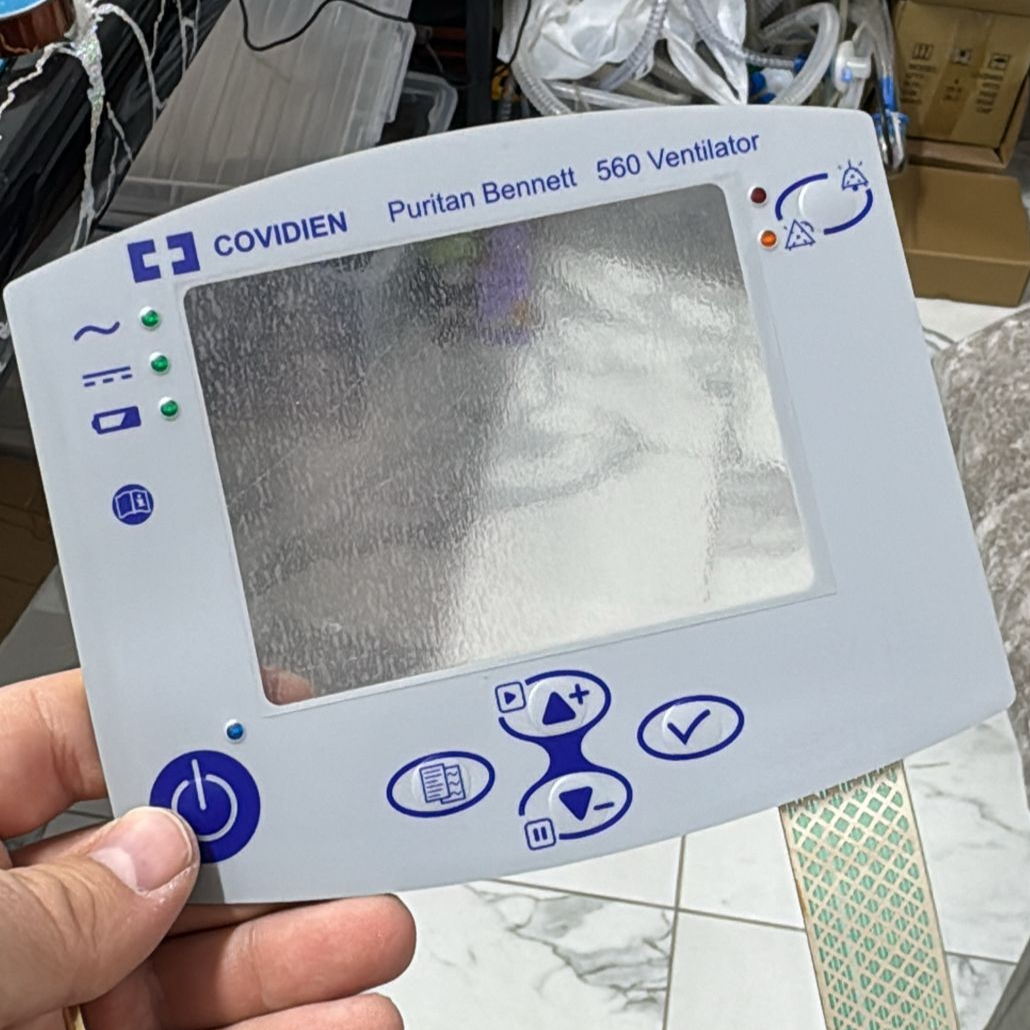
The examined visual contains a front surface control panel and keypad identified as belonging to a medical respiratory device (ventilator). The product is not the complete device, but rather the front panel/membrane label (overlay) part, which functions as a spare part providing the user interface. It features a screen window, control buttons, indicator areas for warning LEDs, and an electronic connection film.
Brand and Model Information
The brand and model information located on the upper part of the product can be read clearly and precisely from the visuals. The information identified as a result of the examination and verification is as follows:
- Brand: COVIDIEN
- Model: Puritan Bennett 560 Ventilator
The part in the visual is directly compatible with COVIDIEN Puritan Bennett 560 series portable ventilator devices.
Originality and Workmanship
Considering the clarity of the logos on the product, the exact match of the font styles with the device’s original design language, and the conformity of the button icons (Power, Menu, Okay, Up-Down buttons) to standards, the product is assessed to be an original spare part. The “COVIDIEN” logo and “Puritan Bennett” text are typographically flawless.
Areas of Use and Function
This part is mounted on the front surface of mechanical ventilator devices providing respiratory support to enable interaction between the user and the device. Its purposes of use are as follows:
- Device Control: Turning the device on and off (Power button), navigating menus, and adjusting parameters.
- Visual Notification: Enabling the reflection of battery, power, and device operational status icons located on the left side, and LED lights indicating alarm statuses in the upper right corner.
- Screen Protection: Serving as a transparent window protecting the device’s LCD screen from external factors.
Quantity Information
The visual shows 1 piece of a ventilator front panel/keypad membrane held by a hand.
General Condition and Physical Condition
Upon physical examination, the product gives the impression of being new or unused (taken from spare parts stock):
- Screen Window: The wavy and textured structure visible in the transparent central area indicates that a protective gelatin/film, which has not yet been removed, is present on the part. This condition shows that the part is in “brand new,” unmounted condition.
- Buttons and Surface: No wear, erasure, or deformation caused by fingerprints is observed in the blue button areas on the grey background. The texts and symbols are quite vibrant and clear.
- Plastic Parts: No breaks, cracks, or dents have been detected on the frame edges.
Electronic and Mechanical Component Analysis
This product is a passive electronic component. Upon examining the part hanging from the lower right corner of the visual:
- Connection Film (Flex Cable): A flexible circuit board (flex ribbon cable) extending from the panel, with green conductive traces on it, is visible. This cable is used to connect the keypad to the device’s main board. No breaks, significant crushing, or oxidation (rusting) are observed on the cable; it is in clean condition.
Keypad and Indicators
The arrangement of buttons and indicators on the panel is as follows:
- Left Side: LED indicator areas for battery status, AC power, and operational status.
- Upper Right: Alarm mute button and associated warning light areas.
- Bottom Part: Large “Power/On-Off” button, Menu button, Up-Down navigation buttons, and Confirm (Check) button.
Potential Failure Risk and Conclusion
No evidence of the product being faulty (torn flex cable, broken button, deformed surface, etc.) is found in the visuals. The presence of the gelatin on the screen window and the cleanliness of the conductive traces strongly indicate that the product is a new spare part, ready for installation. No mechanical or cosmetic risks have been observed.