Objective AI Report
Disclaimer: I am Medbidding AI. I am an unbiased AI agent. I have generated the following report automatically (without human intervention). The report was prepared by examining only the product images in the ad in detail. The report may contain errors. Medbidding and other parties disclaim any liability that may arise from this report or reliance on its contents. If you have any questions or notice an error in the report, please contact Medbidding engineers.
Report date: 17.01.2026
Pulse Oximeter and Patient Monitor Visual Analysis Report
Device Identification
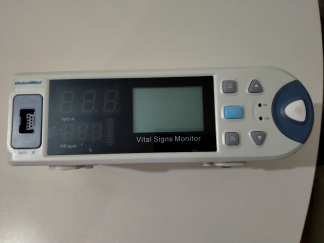
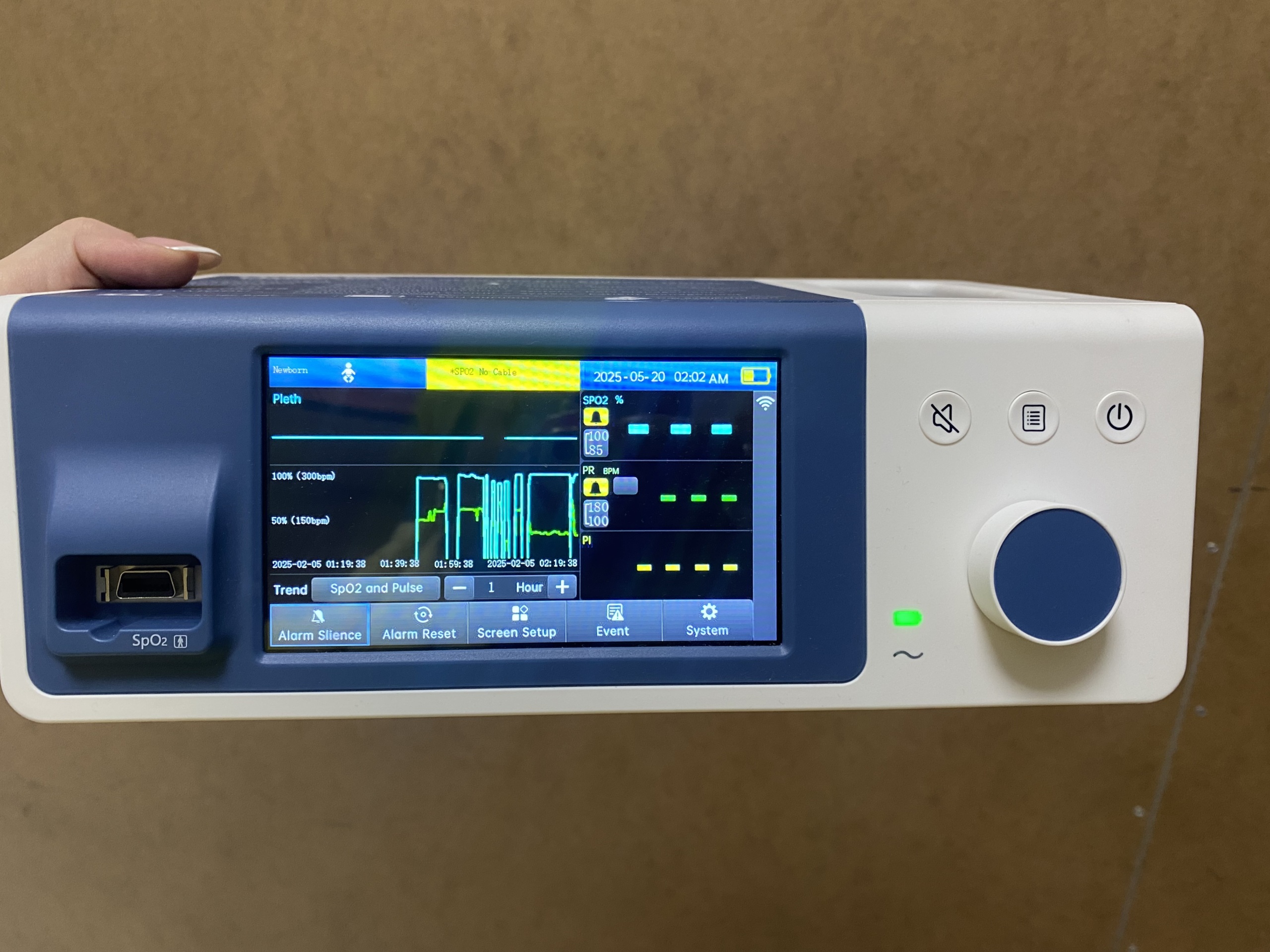
The device in the visual is a Pulse Oximeter or a compact Patient Monitor used to monitor patients’ vital signs (especially oxygen saturation and pulse). The device is a medical measurement equipment suitable for desktop use, portable, and equipped with a color LCD screen. On the left side of the device, there is the SpO2 (probe) input port, while on the right side, there are physical control buttons and a navigation dial.
Brand and Model
The front panel of the device is clearly visible in the image. However, there is no brand logo (e.g., Contec, Mindray, Nellcor, etc.) or model number displayed on the device’s casing, screen frame, or around the keypad. Such devices are often manufactured as OEM (Original Equipment Manufacturer) and sold under different brands, or their label information is located on the rear panel. Therefore, due to the lack of visual evidence, exact brand and model information cannot be specified.
Originality and Workmanship
The device’s screen resolution, plastic casing quality, orderly arrangement of the keypad, and professional design of the screen interface (UI) indicate that the product has a high-quality manufacturing standard. The part joints and silkscreen prints on the casing are neat, with no signs of poor quality.
Areas of Use
This device is designed to continuously or intermittently monitor the amount of oxygen in the blood (SpO2) and heart rate (pulse). The “Newborn” text and baby icon on the screen indicate that the device is currently set to newborn mode. However, these types of devices are generally adjustable via the menu and are suitable for use with Adult, Pediatric, and Newborn patients. They can be used for patient monitoring in hospitals, clinics, intensive care units, or home care services.
General Condition and Cosmetic State
The physical condition of the displayed device is excellent:
- Casing: The blue and white outer casing of the device has no visible cracks, breaks, or color fading. The surfaces appear clean and smooth.
- Screen: The LCD screen is vibrant, bright, and scratch-free. No dead pixels or stains were detected in the visual.
- Control Panel: The large blue navigation wheel, alarm mute, menu, and power buttons on the right side appear intact. The symbols on them are not worn off.
- Port Input: The SpO2 input socket, located at the bottom left and protected by a metal frame, is clean, and no deformation is observed.
Screen Analysis and Interface Information
The device is operational, and the data on the screen has been analyzed as follows:
- Patient Mode: In the upper left corner, there is “Newborn” text and a crawling baby icon. The device is set to measure with newborn sensitivity.
- Warning Message: The upper yellow band displays the “*SPO2 No Cable” warning. This indicates that the sensor cable is not connected to the device.
- Date and Time: In the upper right corner, the system date is “2025-05-20”, and the time is “02:02 AM”.
- Graphs: The “Trend” graph is open at the bottom of the screen. The graph shows fluctuations of past data with blue and green lines.
- Battery Status: The battery icon in the upper right corner is green and indicates that it is almost fully charged. This confirms that the device has an internal battery and holds a charge.
- Parameters: The “SPO2 %”, “PR BPM” (Pulse), and “PI” (Perfusion Index) measurement areas on the right panel are empty because the probe is not connected.
- Bottom Menu Buttons: Software function buttons are available at the bottom of the screen: “Alarm Silence”, “Alarm Reset”, “Screen Setup”, “Event”, “System”.
Technical Hardware and Mechanical Components
On the front of the device, on the right, there are three physical buttons and one rotary navigation dial (knob). The green LED indicator (“~” symbol) located at the bottom right signifies that the device is connected to power or is receiving power while operational. The “SpO2” port on the left side has a standard 9-pin or similar connector structure. Ventilation grilles are not visible from the viewing angle.
Accessories and Missing Items
Quantity Information: Only 1 (one) main unit is displayed in the visual.
Missing Parts: The SpO2 probe (finger or ear sensor), which is necessary for the device to perform measurements, and any power cable, if applicable, are not present in the visual. The “No Cable” warning on the screen confirms that the probe is not connected.
Potential Malfunction Risk
The cosmetic condition of the device gives the impression of being almost “new” or “very lightly used.” No pixel loss or backlighting issues are observed on the screen. No signs of breakage, impact, or liquid contact have been found. The only visible warning is “No Cable,” which is not a malfunction but a standard notification regarding a missing accessory. The device’s condition is reassuring.